Modules - Risks
Every Ciso needs to constantly be aware of the risks associated to the company. The Risks module is used to manage the risks associated to the company.
The CyberView system will create a "Final Risk Score" for the company based on the risks that are associated to the company.
There are three kinds of risks:
- Manually: Risks that are manually created by the Ciso, on the following modules:
- News: The Ciso can create risks from a news.
- CVE: The Ciso can create risks from a CVE.
- Assets: The Ciso can create risks from an asset.
- Requirements: Risks that are created automatically based on the requirements that are not complied and should be.
- Suggested: The system will automatically suggest potential risks based on the following criteria:
- Assets + CVE: CVEs that are associated to Assets of the company.
Risk Structure
Each Risk has two states (Before and After), and a timeline of the changes that have been made to the risk. Additionally, because no risk is never eliminated, when the Ciso changes the state of a risk to "After", than the Ciso needs to re-assess the risk again but this time the "after" state will be the new "before" state.
Risk Table
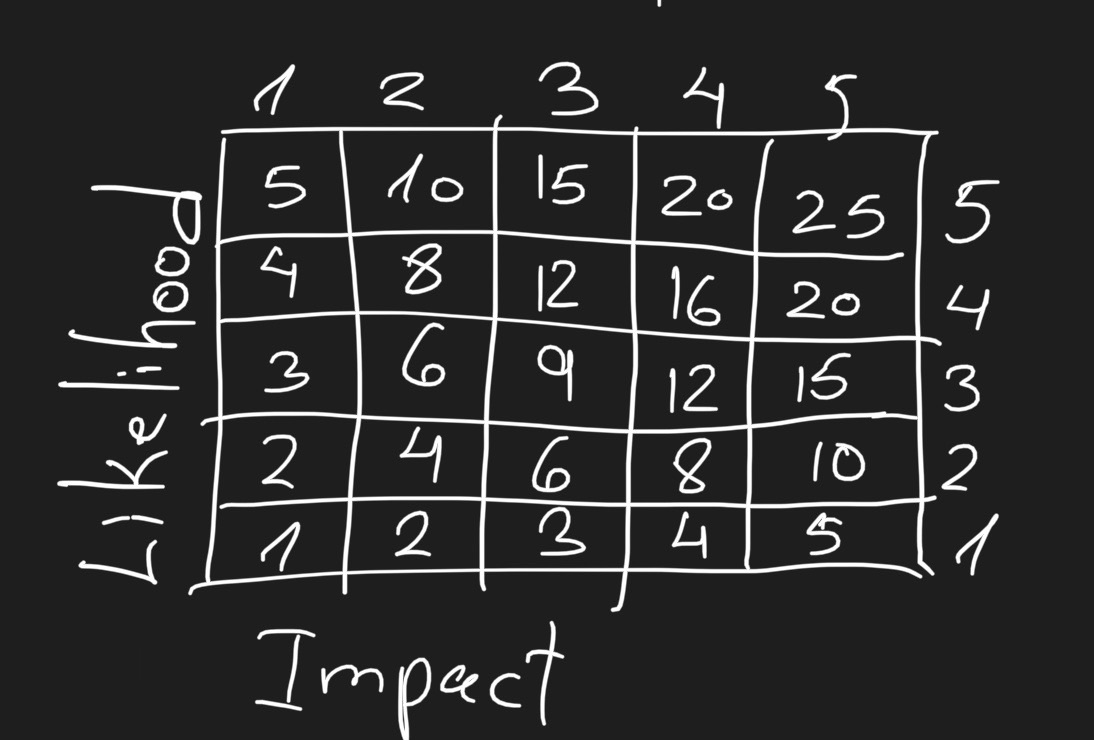
The "Risk Table" is an international way to represent a risk of a company.
The "Risk Table" is a graph of numbers to get a score for the risk by likelihood and impact of the risk.
Before State
The Ciso needs to assess the risk before it is "After". The assessment is done by the Ciso on the following parameters:
- Threats
- Vulnerabilities (CVE) on the Assets
The assessment is to the following questions, on a "Risk Table" for each question and the final score is average of the scores of all the questions:
- What is the danger to the company's data? // Example: 20
- What is the danger to the company? // Example: 10
note
the final score is the average of the scores of the questions (20 + 10) / 2 = 15
After State
The "after" state is declared after the reaction. The response can be one of the following:
- Avoid: Eliminate the risk.
- Modify: TODO
- Retail: TODO
- Share: TODO
Additionally, the Ciso can needs to specify whether the risk is linked to a specific requirement in the Compliances or not so it will be completed when done.
The assessment of the after state of the risk is looking like the before state assessment:
- What is the danger to the company's data? // Example: 8
- What is the danger to the company? // Example: 4
note
the final score is the average of the scores of the questions (8 + 4) / 2 = 6